Configure TLS
This guide shows how to secure SMG communications with TLS and mTLS planning.
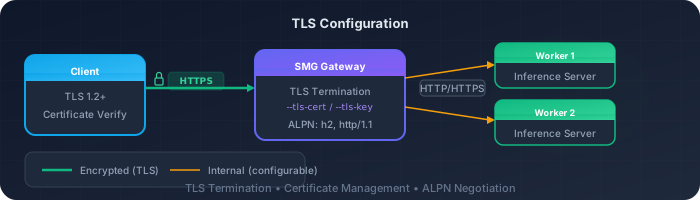
Overview
SMG supports TLS configurations for securing communications:
| Configuration | Purpose | Status |
|---|---|---|
| Server TLS | HTTPS for client → gateway communication | Available |
| Client mTLS | Mutual TLS for gateway → worker communication | Planned |
Generate Certificates
For testing, generate self-signed certificates:
Step 1: Create CA
# Generate CA private key
openssl genrsa -out ca.key 4096

# Generate CA certificate
openssl req -new -x509 -days 365 -key ca.key -out ca.crt \
  -subj "/CN=SMG CA/O=SMG"
Step 2: Create server certificate
# Generate server private key
openssl genrsa -out server.key 2048

# Generate server CSR
openssl req -new -key server.key -out server.csr \
  -subj "/CN=smg.example.com/O=SMG"

# Sign with CA
openssl x509 -req -days 365 -in server.csr \
  -CA ca.crt -CAkey ca.key -CAcreateserial \
  -out server.crt
Step 3: Create client certificate (for future mTLS)
# Generate client private key
openssl genrsa -out client.key 2048

# Generate client CSR
openssl req -new -key client.key -out client.csr \
  -subj "/CN=smg-client/O=SMG"

# Sign with CA
openssl x509 -req -days 365 -in client.csr \
  -CA ca.crt -CAkey ca.key -CAcreateserial \
  -out client.crt
Enable Server TLS
Serve the gateway over HTTPS.
Configuration
smg \
  --worker-urls http://worker:8000 \
  --tls-cert-path /path/to/server.crt \
  --tls-key-path /path/to/server.key \
  --host 0.0.0.0 \
--port 443Verification
curl --cacert ca.crt https://smg.example.com/healthClient mTLS (Planned)
Certificate verification failed
For now, gateway-to-worker communication uses plain HTTP/HTTPS without mutual TLS. If your workers require mTLS, consider using a service mesh (like Istio) or a sidecar proxy to handle the mTLS termination.When implemented, client mTLS will secure communication between the gateway and workers:
# Planned - not yet available
smg \
  --worker-urls https://worker1:8443 https://worker2:8443 \
  --client-cert-path /path/to/client.crt \
  --client-key-path /path/to/client.key \
  --ca-cert-path /path/to/ca.crt
Full TLS Configuration
Currently, only server TLS is supported via CLI:
smg \
  --worker-urls http://worker1:8000 http://worker2:8000 \
  --tls-cert-path /etc/certs/server.crt \
  --tls-key-path /etc/certs/server.key \
  --api-key "${API_KEY}" \
  --host 0.0.0.0 \
  --port 443
Kubernetes with cert-manager
Use cert-manager for automatic certificate management.
Step 1: Install cert-manager
kubectl apply -f https://github.com/cert-manager/cert-manager/releases/download/v1.14.0/cert-manager.yamlStep 2: Create Certificate
apiVersion: cert-manager.io/v1
kind: Certificate
metadata:
  name: smg-tls
  namespace: inference
spec:
  secretName: smg-tls-secret
  issuerRef:
    name: letsencrypt-prod
    kind: ClusterIssuer
  dnsNames:
    - smg.example.com
Step 3: Mount in deployment
spec:
  containers:
    - name: smg
      volumeMounts:
        - name: tls-certs
          mountPath: /etc/certs
          readOnly: true
      args:
        - --tls-cert-path
        - /etc/certs/tls.crt
        - --tls-key-path
        - /etc/certs/tls.key
  volumes:
    - name: tls-certs
      secret:
secretName: smg-tls-secretVerification
Test server TLS
# With CA certificate
curl --cacert ca.crt https://smg.example.com/health

# Check certificate details
openssl s_client -connect smg.example.com:443 -showcerts
Test worker connectivity
# Check SMG logs for worker connections
kubectl logs -n inference -l app=smg | grep -i worker

# Verify worker connection via control plane API
curl https://localhost:30000/workersTroubleshooting
Connection refused
1. Verify CA certificate matches:
```bash
openssl verify -CAfile ca.crt server.crt
```

2. Check certificate expiration:
```bash
openssl x509 -in server.crt -noout -dates
```

3. Verify hostname matches:
```bash
openssl x509 -in server.crt -noout -text | grep DNS
```
Handshake failure
1. Check SMG is listening on correct port:
```bash
netstat -tlnp | grep smg
```

2. Verify TLS configuration in logs:
```bash
smg --tls-cert-path ... 2>&1 | grep -i tls
```1. Check TLS version compatibility
2. Verify cipher suite support
3. Ensure certificate chain is completeWhat's Next?
- Monitoring — Set up observability and alerts
- Authentication Concepts — Security architecture and controls